Homelab
Nine machines, four segmented VLANs, daily backups with a tested restore, and every service over valid HTTPS without opening a single port to the outside.
- Machines
- 9 (8 containers, 1 VM + OPNsense)
- VLANs
- 4
- Ports open to the outside
- 0
- Daily backup
- 02:30, 9 machines in 5 min 51 s
- Restore tested
- Yes, end to end
- Mistakes documented
- 18
- Stack
- Proxmox VE, OPNsense, Tailscale, Proxmox Backup Server, Nginx Proxy Manager, Docker, Debian
A small home server hosting what used to be spread across third-party services: photos, passwords, a media library, and an isolated lab for practising offensive security. Since September it also hosts the backend of NOVA.
The interesting part isn’t the list of services, which is the usual one. It’s the network (four separate VLANs, a firewall of my own between them and remote access over a private network with nothing exposed to the internet), the backups, and above all the mistakes section, which has more entries than the wins and is the most useful part of the whole document.
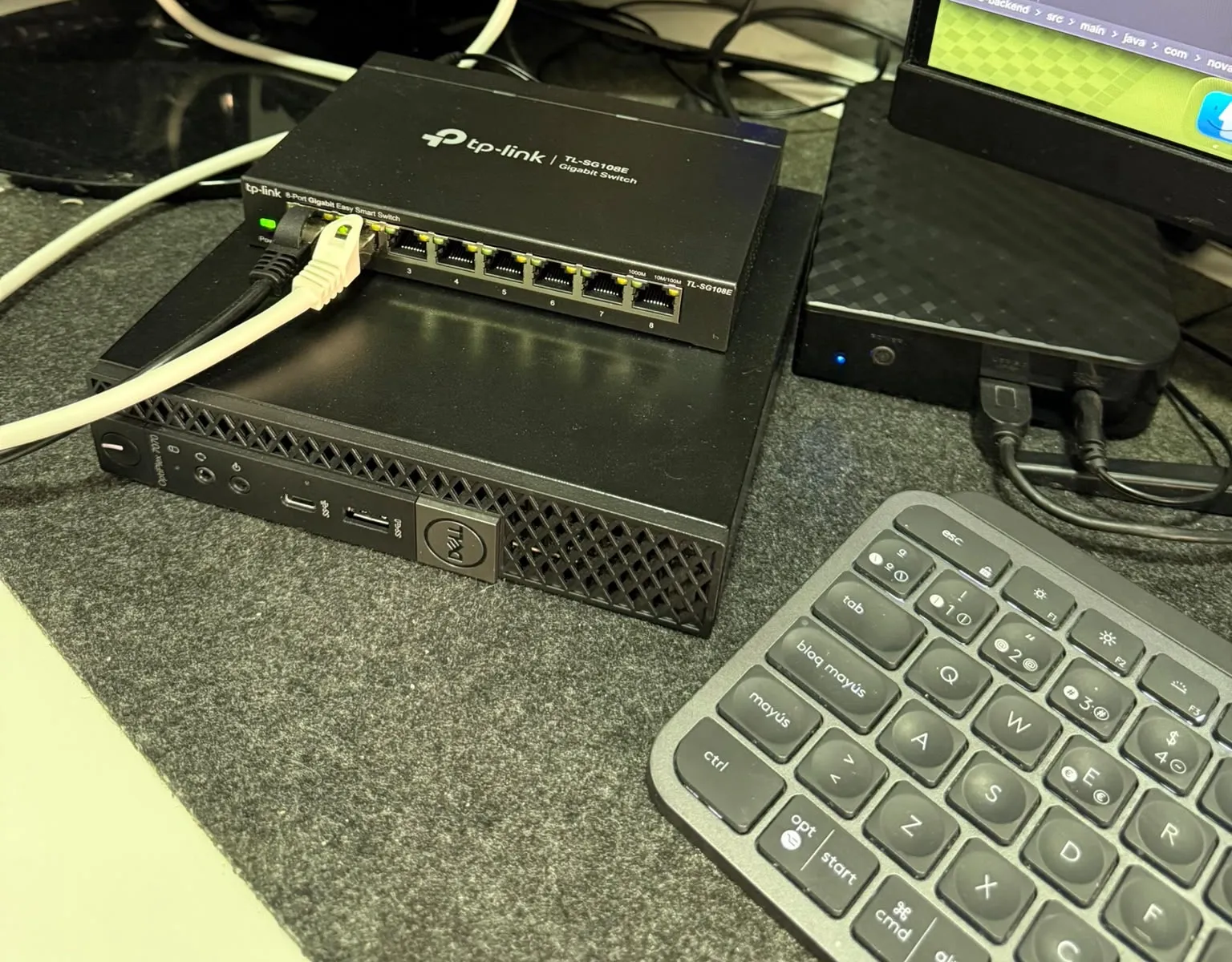
Hardware
| Equipment | Specs | Role |
|---|---|---|
| Dell OptiPlex 7070 Micro | i7-9700T (8 cores), 32 GB DDR4, 256 GB NVMe | Main server |
| Acer Aspire E15 | i7-4510U, 8 GB, 1 TB HDD | Practice machine |
| TP-Link TL-SG108E | 8 gigabit ports, 802.1Q managed | Switch |
| Verbatim Store ‘n’ Save | 6 TB, USB 3.0, 5,400 rpm HDD with external power | Main storage: media, photos and backups |
| ISP router | Internet access |
The Dell was bought second-hand for €289, with 30,400 hours on the NVMe and 95 % health. Two details that cost an afternoon if you don’t know them: the 7070 Micro has no HDMI (you need a DisplayPort adapter) and the front USB-C doesn’t carry video.
Network architecture
                    Internet
                        |
                   ISP router
                        |
                        | cable -> port 1
                        v
              TP-Link TL-SG108E switch
                        |
                        | port 2 (trunk, VLANs 10/20/50 tagged)
                        v
              +-----------------------------------+
              |   Dell - Proxmox VE 8.4           |
              |                                   |
              |   eno2 (physical NIC)             |
              |    +-- vmbr0   (untagged)         |  home network
              |    +-- eno2.10 -> vmbr10          |  Management
              |    +-- eno2.20 -> vmbr20          |  Services
              |    +-- eno2.50 -> vmbr50          |  Lab
              |                                   |
              |   VM 100: OPNsense                |  one leg on each bridge
              |   CT: Pi-hole, Jellyfin,          |
              |       qBittorrent, Vaultwarden,   |  -> vmbr20
              |       PBS, NPM, Immich            |
              |   VM: Kali Linux                  |  -> vmbr50
              |                                   |
              |   Verbatim 6 TB (USB 3.0)         |
              |    +-- library/  -> Immich        |
              |    +-- media/    -> Jellyfin, qBittorrent
              |    +-- backups/  -> PBS datastore |
+-----------------------------------+| VLAN | Name | Purpose | DHCP |
|---|---|---|---|
| — | Home (untagged) | The ISP’s network, as it was | Router |
| 10 | Management | Proxmox and OPNsense administration | Yes |
| 20 | Services | Every daily-use service | Yes |
| 50 | Lab | Kali and vulnerable machines | No, on purpose |
The lab VLAN has no DHCP: vulnerable machines get fixed IPs so you know exactly what you’re attacking. And the lab isn’t cut off from the internet, which was the original design: to connect to external labs over VPN it needs to get out. What has to be prevented is it contaminating Management, Services or the home network, not it lacking a way out.
The key decision: one bridge per VLAN
There are two ways to do VLANs in Proxmox: a single vlan-aware bridge with the 802.1Q VLANs defined inside OPNsense, or one bridge per VLAN, each with its own physical sub-interface. The second was chosen.
Why: the first option is exactly what broke the setup on the first attempt,
because I ended up with the two tagging layers stacked (see mistakes). With
one bridge per VLAN, Proxmox does all the tagging, OPNsense sees four normal
interfaces without knowing anything about 802.1Q, and containers plug into
their bridge without configuring tags. It’s more verbose in
/etc/network/interfaces, but impossible to get confused about.
Why 10.10.x.x and not 192.168.x.x
Almost every home router uses 192.168.1.x. When trying to reach a homelab
service from another network that also used that range, the laptop assumed
the IP was local and never routed the traffic through the tunnel. With
10.10.x.x there’s no collision: the client knows that IP isn’t on its
network and sends it through Tailscale.
Services
| Service | Form | Purpose |
|---|---|---|
| OPNsense | VM | Firewall between VLANs and DHCP for each |
| Pi-hole | LXC | DNS for the whole infrastructure, with ad blocking. OPNsense uses it for its own queries and hands it out over DHCP |
| Jellyfin | LXC | Media library, with hardware transcoding (QuickSync) |
| qBittorrent | LXC | Downloads, with folders shared with Jellyfin through a bind mount |
| Vaultwarden | LXC + Docker | Password manager; the vault was migrated from the cloud |
| Proxmox Backup Server | LXC | Incremental, deduplicated backups of everything |
| Nginx Proxy Manager | LXC + Docker | Single entry point with a wildcard certificate |
| Immich | LXC + Docker Compose | Photos and videos; the service with the biggest daily impact |
| Kali Linux | VM | Pentesting, on the lab VLAN |
Two choices of form deserve an explanation. Kali runs as a full virtual machine rather than a container because an LXC shares the host kernel, and pentesting tools need to manipulate the network stack at a low level (promiscuous-mode capture, traffic injection). And PBS runs in an LXC even though Proxmox recommends a VM or dedicated hardware: the deciding argument was the disk, because in an LXC the store attaches through a bind mount identical to Jellyfin’s, whereas a VM would need passthrough of a USB disk, considerably more fragile. The underlying reason for the official recommendation, that a backup shouldn’t share its destination with what it protects, wouldn’t be met by a VM either: the disk is plugged into the same Dell.
Remote access without opening ports
All access comes in through Tailscale. The Dell advertises the Services and Lab subnets, so from the laptop or the phone, on any network, every service is reachable as if at home. The router has no open ports.
Up to a point that was done by IP:port unencrypted, with “not secure”
warnings and native apps rejecting invalid certificates. The solution was a
single entry point with clean URLs and real HTTPS:
Browser (on the tailnet)  ---  https://service.ayyoub.dev  --->
   1. DNS: Cloudflare answers with the proxy's private IP
   2. Traffic travels over Tailscale to the Services VLAN
   3. Nginx Proxy Manager terminates TLS with the *.ayyoub.dev certificate,
      reads the Host header and forwards to the right service
Three parts: Cloudflare as the domain’s authoritative DNS (and the API used to prove ownership), Let’s Encrypt issuing a wildcard certificate through DNS-01 validation, and Nginx Proxy Manager routing by domain name. One server serves dozens of subdomains on the same port 443 that way.
Two details worth knowing. The public DNS records resolve to private
addresses: anyone can look up the name, but only someone inside the tailnet
reaches the IP. And the .dev domain is on the browsers’ HSTS preload list,
which forces HTTPS across the whole domain; there’s no shortcut over plain
HTTP, which here was the point.
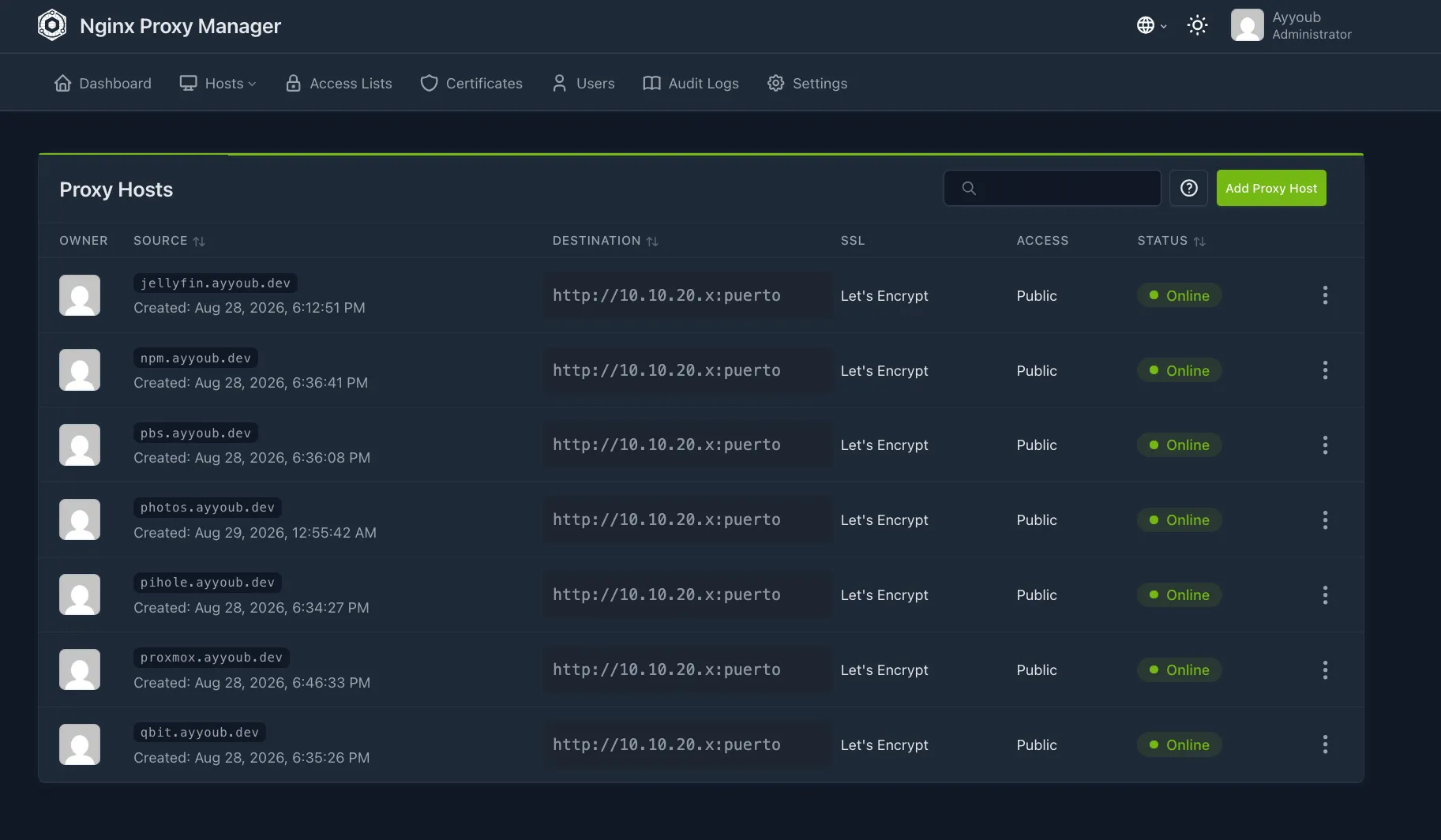
What deliberately isn’t published
OPNsense lives in Management, and the firewall rules block traffic from Services to Management. The proxy is in Services: it can’t reach OPNsense. Making it work would require punching a hole in that rule, that is, weakening the isolation of Management to expose precisely the firewall that governs it. Ruled out. OPNsense is still administered over an SSH tunnel, and the friction is proportional to how rarely it’s touched and how much it matters.
Vaultwarden doesn’t go through the proxy either: it already has a valid certificate through Tailscale Serve, which issues real certificates for any node on the network without managing a CA, and every client app is configured with that URL. Putting the proxy on top would duplicate paths to a service that already has HTTPS.
And this website
Hosting ayyoub.dev on the homelab itself was considered. Today there are no
open ports and a public website would break that property, so the options
were an outbound tunnel (Cloudflare Tunnel: the router stays closed, the
residential IP isn’t exposed), hosting it elsewhere (Cloudflare Pages, GitHub
Pages), or opening 80/443 on the router. The last is the only one that
exposes the home IP and suffers constant bot scanning. This site is, for
now, hosted outside.
Storage
The 6 TB disk came from the factory in NTFS with old material on it. Before deciding anything it was mounted read-only, which is the step that makes it impossible to break something while you think. A detail worth remembering: the data partition was the second one, not the first; the first, 16 MB, is a reserved partition Windows creates on GPT disks. Assuming “the first one is the data” would have led to mounting the wrong one.
Then: repartitioned to ext4, permanent mount by UUID (verified after a reboot) and three folders that are not the same thing:
library/: Immich’s photos and videos. Original data.media/: films and series. Consumable and replaceable.backups/: the Proxmox Backup Server store, with no access from any other container.
If the films are lost, they get downloaded again; if the photos are lost, they don’t. That makes the library the second most critical data in the homelab, after the password vault, and it’s what orders everything else.
The disk that kept falling asleep
External HDDs go to sleep by two different routes: the enclosure’s internal
logic, which the operating system often can’t touch, and power management
through ATA commands. This USB-SATA bridge does pass ATA commands through, so
hdparm -B 255 -S 0 disables the spin-down. Since it’s lost on reconnect, a
udev rule reapplies it every time the disk appears.
The rule very nearly never worked. The first attempt filtered on ID_SERIAL
looking for “Verbatim”, but that identifier reports the actual internal
drive (a Toshiba), not the enclosure; the string only appears in
ID_USB_SERIAL. The rule would have sat in the system looking configured.
The verification that turns it into “it is configured” is by reversal: force
the opposite state by hand, trigger the rule and check that it reverts it.
It returned the right value, and that proves the rule runs, not that the
value simply stayed as it was.
Backups
Until late August the homelab had no backups of any kind. An NVMe failure would have taken the OPNsense configuration (VLANs and rules from scratch), the password vault and the configuration of every container.
PBS versus the native backups
| Criterion | Proxmox Backup Server | Native PVE |
|---|---|---|
| Incremental | Yes, real | No: full dump every time |
| Deduplication | Yes | No |
| Restore a single file | Yes | No, only the whole dump |
| Complexity | Medium | Minimal |
PBS was chosen for granular restores and for incrementals, which turn a daily backup into a matter of seconds: the first took 22 s, the following ones less. Daily job at 02:30 with a retention of 7 daily, 4 weekly and 6 monthly. The first automatic job was verified the next day: nine machines in 5 min 51 s, including a container created that same night.
The restore, which is the step you don’t skip
A backup that has never been restored is an assumption, not a backup. The Vaultwarden container was restored to a new container, without touching the production one and without starting it automatically (it would inherit the original’s network configuration and there would be an IP conflict). Then, with the restored one started:
db.sqlite3          286720 bytes   <- the vault
db.sqlite3-wal           0 bytes   <- no half-written transactions in the snapshot
rsa_key.pem           1675 bytes   <- signs the session tokens
Each file confirms a different thing. The WAL at zero bytes was precisely the doubt about snapshot mode: it came out clean. Without the RSA key, every device would have to authenticate again.
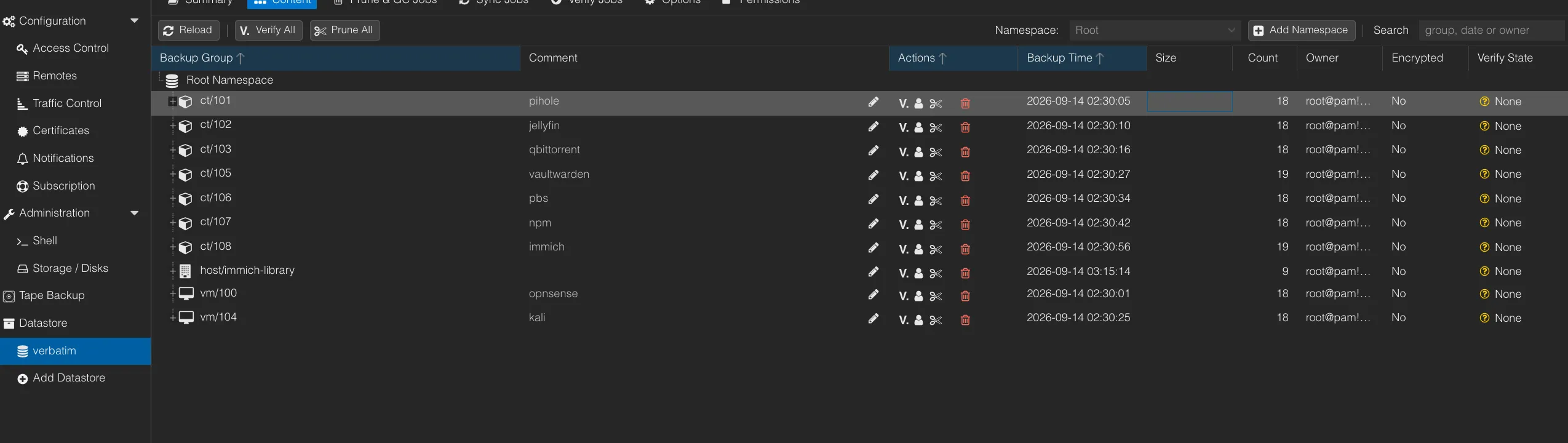
What the backup wasn’t covering
The day after uploading the first 4,133 photos to Immich, and before deleting them from the iPhone, I checked that they were backed up. They weren’t.
The signal was the duration: a manual backup of the Immich container finished
with TASK OK in three minutes, impossible for 44 GB over a USB disk. The
datastore still took up the same space as before the library was uploaded.
And the log said so, in a line that’s easy to skip over:
INFO: excluding bind mount point mp0 ('/library') from backup (not a volume)vzdump doesn’t back up bind mounts. Ever. It only backs up volumes managed
by Proxmox; a bind mount points at an arbitrary folder on the host and it
ignores it by design. Adding backup=1 to the mount point doesn’t help: that
option only applies to volumes. And it wasn’t just Immich: the same reasoning
applies to media/, only there it’s irrelevant.
Of three options (the PBS client from the host, rsync to another disk, or
converting the bind mount into a volume), the first was chosen:
proxmox-backup-client backing up the directory straight into the existing
datastore, scheduled with a systemd timer at 03:15. It reuses the
infrastructure that was already there.
State of protection
| Data | Backed up by | Copy |
|---|---|---|
| Containers and VMs | vzdump to PBS, daily at 02:30 | Verbatim |
| Immich database | Inside the container | Verbatim |
| Photo library (44 GB) | proxmox-backup-client, daily at 03:15 | Verbatim |
| Password vault | Inside the container | Verbatim |
| Media | Not backed up, on purpose: it’s replaceable | — |
Everything is on the same physical disk. The protection covers my own mistakes, logical corruption and NVMe failure. It doesn’t cover failure of the Verbatim itself, theft, fire or a power surge. The options evaluated for the off-site copy:
| Option | Cost | Advantage | Drawback |
|---|---|---|---|
| Rotating USB disk | €60-70 once | Unplugged, immune to ransomware | Depends on remembering to rotate it |
| Remote PBS at a relative’s house | A mini PC | Automatic over Tailscale | Hardware and somewhere to put it |
| Cloud (Backblaze B2 or similar) | Under €1/month for 110 GB | Outside my own physical control | Slow initial upload; a fee |
| Just the vault to the cloud | Almost free | Covers the most critical data in ten minutes | Doesn’t cover the photos |
The plan: start with the encrypted vault export, which is the minimum viable and immediate, and add the rotating disk for the photos. I’m writing it down because putting it in writing makes it more likely I actually buy it.
Photos: Immich
A self-hosted replacement for Google Photos or iCloud: automatic upload from the phone, face recognition, content search. It was the first deployment possible after having a disk and backups: replacing a provider with geographic redundancy with a store with no copies would have been a step backwards.
It got 4 cores and 4 GB, well above the rest: face recognition and object
detection are sustained loads. The folder is called library and not
photos because Immich also manages videos, which in almost any library take
more space than all the photos put together.
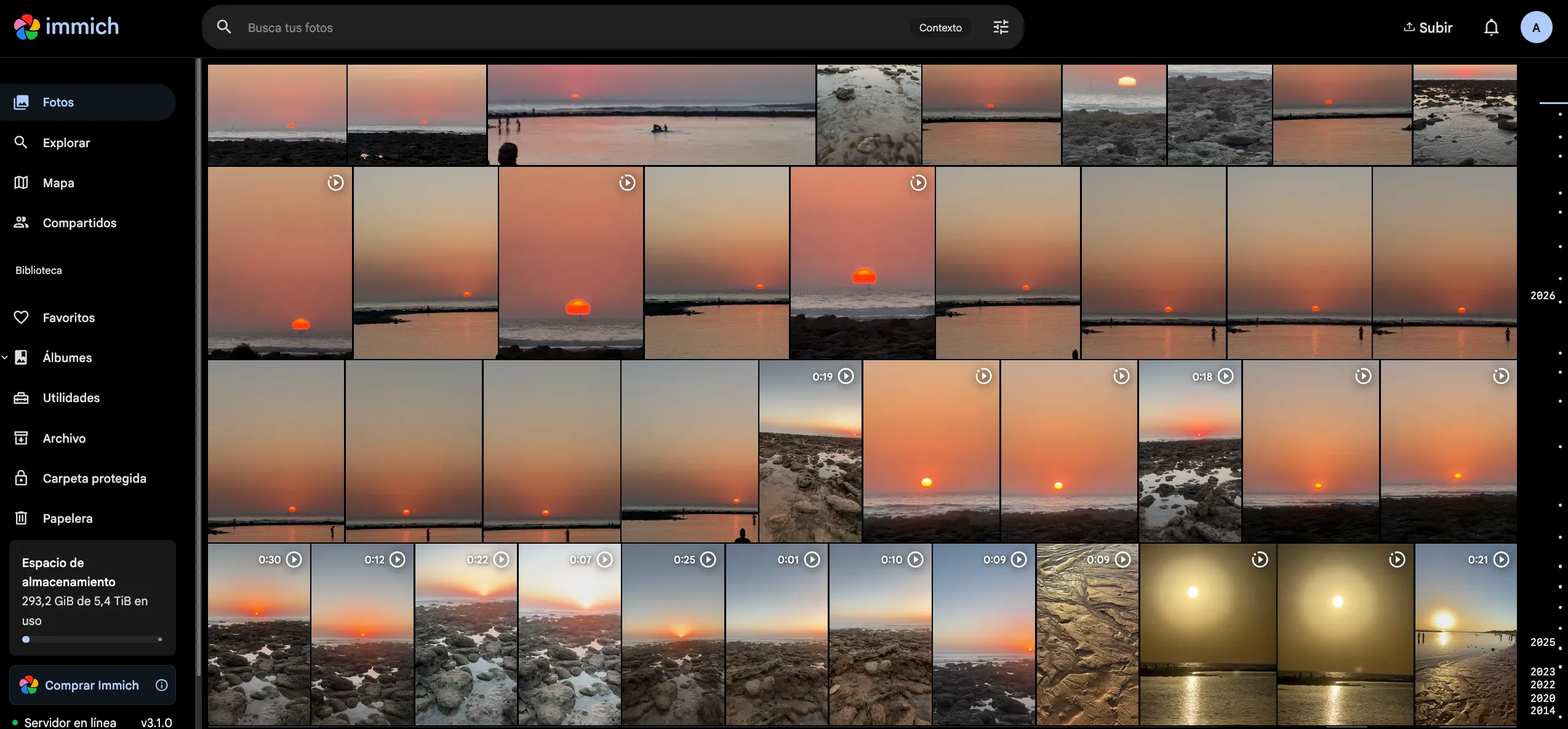
A passthrough that stopped at the middle layer
Immich transcodes the iPhone’s HEVC videos to H.264 once, on import, and the
integrated graphics accelerates it. The /dev/dri passthrough to the
container was verified and the devices were there. Even so, Immich failed
with Device 'renderD128' does not exist.
The cause: Immich runs inside Docker, which runs inside the LXC. Three layers, and the passthrough only covered two. Docker doesn’t inherit the devices of the system it runs on; they have to be declared in the compose file. With Jellyfin the same passthrough was enough because Jellyfin runs natively in the LXC, so the verification that was definitive there only checked half the path here.
And a second level of the same problem: once visible in Docker, the device
still couldn’t be opened (Device creation failed: -22). Seeing the device
and having permission to use it are different things. In an unprivileged
container, not even root can bypass the permissions of a file whose owner
falls outside the mapped UID range.
Mistakes made
The most useful section of the document. All eighteen are on record with symptom, cause and lesson; these are the ones that teach the most.
Double VLAN layer
I configured bridge-vlan-aware on the Proxmox bridge and, on top of that,
802.1Q VLANs inside OPNsense on the same interface. Two systems tagging the
same traffic. The symptom was that packets simply didn’t arrive
(Destination Host Unreachable one way, tcpdump seeing nothing the other),
and the diagnosis took hours because each layer, on its own, was fine. Pick
one strategy and be consistent: two correct solutions applied at once to the
same problem add up to a wrong one.
Changes that looked permanent
Three times the same pattern, and by the third it stopped being a coincidence:
| Case | What it looked like | What it was |
|---|---|---|
ip_forward | Configured with sysctl -p | The line never made it into /etc/sysctl.conf; a reboot silently reset it to zero and access to the lab VLAN stopped working days later |
The disk’s udev rule | Filtering on “Verbatim” | ID_SERIAL reports the internal Toshiba, not the enclosure |
lvm.conf | sed ran without error | Every match was commented out: it edited an example line inside a comment |
The habit that catches all of them: after configuring something, verify by reading the result, not by assuming the command did what it looked like. And with an automation, the definitive test is to force the opposite state and check that it reverts.
The same mistake twice in a row
When adding TLS to Vaultwarden, the container was launched with -p 443:443,
but the log clearly said Rocket was listening on internal port 80, TLS and
all. The mapping connected the outside to a port with nothing on it:
tls handshake eof. Fixed to -p 443:80. And when configuring Tailscale
Serve I pointed it at the container’s port 80, which has nothing mapped
outward. Same mistake, same cause, the second time for not applying the
lesson of the first. With docker run -p EXTERNAL:INTERNAL, only the
external one is reachable from outside; the first thing to do on a
connection error is docker ps, not the port that seems obvious.
A form submitted without the critical field
When requesting the wildcard certificate, the form was sent with the
Cloudflare token empty. The interface returned an “Internal Error” that said
nothing; the container log had the real message (Invalid access token).
The immediate second attempt returned 429 Too many authentication failures: Cloudflare blocks temporarily after several failures, so
insisting makes things worse. Two lessons: the container log has the real
error, and on an authentication failure against an external API you don’t
retry in a loop.
Assuming something was backed up that never went into the backup
Told above. A backup that finishes fine doesn’t mean it contains what you
think; duration and size are diagnostic signals; du -sh on the datastore is
the most direct check; and you verify before destroying the original. Here
it was checked before deleting the photos from the iPhone. Had they been
deleted first, the only copy would have been the USB disk, unbacked and
unknowingly so.
The short ones
- Proxmox’s website served the ARM64 ISO when downloading from a Mac with
Apple Silicon. The USB wouldn’t boot and the EFI file was called
bootaa64.efi. - I configured OPNsense on the live system without running the installer. After the first reboot, everything was gone.
- The VLANs were configured as tagged on the router’s port instead of the Dell’s. A photo of the switch before configuring helps.
ip addr addandip route addwere lost on every reboot. Permanent settings go in/etc/network/interfaces.bridge vlan add ... selfleft the Dell with no network and no web access. Before touching the bridge, have a monitor and keyboard at hand.- An
rm -rfrun in the host’s shell instead of the container’s. It did no harm because the path didn’t exist on the host, by pure coincidence of names. Before anrm -rf, look at the hostname in the prompt. - A service with anti-DNS-rebinding protection returns
401when accessed over an SSH tunnel, because theHostheader doesn’t match. It isn’t a bug in that service: it’s a pattern.
Changing ISP
On 7 September the internet provider changed and the whole infrastructure became unreachable. The signal that steered the diagnosis was that Tailscale didn’t work either: had only the local IP failed, it could have been routing, VLANs or the switch; that remote access failed too narrowed it to a single cause, the Dell had no way out to the internet. No internet, no remote access, so physical access was needed.
The cause turned out to be trivial: the new router came on 192.168.0.x and
the Dell had a static IP on 192.168.1.x. Two networks with no point of
contact. There were two options: change the router’s LAN (one value, in one
place) or adapt the homelab to the new range (Dell IP, OPNsense WAN, the
route advertised in Tailscale, the DHCP reservation). The first was chosen
for three reasons: less room for error, because touching the OPNsense WAN
without a tunnel means doing it from the console and a slip there leaves the
internal network dead; the homelab gains nothing from the change, because
the range wasn’t the result of any design decision; and it will happen
again, because the next ISP change will be the same adjustment.
A static IP is convenient until the environment changes: it’s what keeps the Dell findable and what left it cut off. A remotely administered homelab needs a plan for when remote doesn’t work.
What’s left
Top priority: the off-site copy, still the most serious gap. Then monitoring (Uptime Kuma to know whether a service responds, Beszel to know how healthy it is). Medium term: a UPS with orderly shutdown, a small wall rack to get the gear off the desk, a mini PC with four ports to get OPNsense out of the VM, an access point with VLAN support to segment the wifi, an Active Directory lab on VLAN 50 and something on the defensive side (Wazuh or Security Onion).
And a periodic watch that’s already written down: thin pool usage and disk space monthly, certificate expiry quarterly and, the one most easily forgotten and the only one that proves the backup system still works, a test restore every three months.
Ruled out with reasons: AdGuard Home (duplicates Pi-hole and splits DNS resolution across two places), Portainer (with two Docker containers it keeps you from understanding the commands), Nextcloud (Immich covers the main use case better).
Notes from this project
- Three layers, two problems: a GPU passthrough that stopped halfway
The device was in the container, the check confirmed it, and the app still couldn't see it. Because the app was running one layer further in. And once it could see it, it had no permission to open it.
- Three times it "looked configured": verify by reading the result, not by assuming
A sysctl that didn't persist, a udev rule that would never have fired and a sed that edited a comment. No command returned an error. The habit that catches all three is the same one.
- A backup you never restore is a big folder with a reassuring name
I set up automatic backups for nine machines and everything showed green. The photo library, the only irreplaceable data, was left out. What gave it away was a backup that finished too fast.